01 / The context
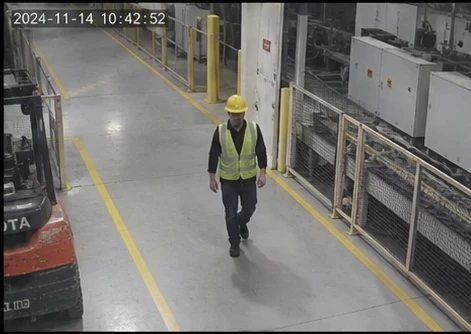
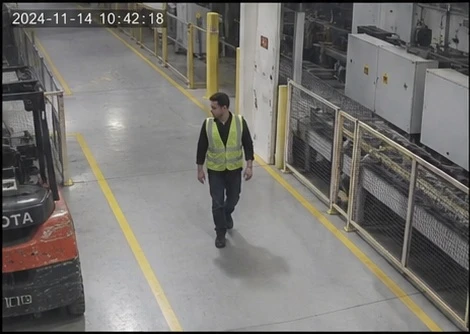
Hard hats required.
Hard hats are not a catalog tag, so this check is a custom question. The context text tells the model the rule; the camera image is the evidence.
Custom questions are Beta and their accuracy is not measured.Kirkwood API / api-contract@2.0.1
Video stays on your network: the Kirkwood SDK runs next to your cameras, on-prem or hybrid, and sends only the frames that need judgment to the model API. The API is stateless: POST a camera image, or up to 16 frames from one camera, with the tag ids you want. Get yes or no with a probability for each tag, plus people and vehicle counts and bounding boxes. Request access at app.kirkwood.ai. Once approved, create an API key in the app. Copy this guide as Markdown for your AI coding assistant.
Detection tags
Every tag below is Beta: we do not yet have enough real camera footage to state its accuracy, so test it on your own cameras before you rely on it. Send any of these ids in tags, or "all". GET /v1/tags returns the same list with each tag’s stage.
SDK
The Kirkwood SDK keeps everything that needs memory across frames: tracking, line crossings, zone occupancy, schedules, alert persistence and cooldown. It runs on the Kirkwood edge box next to your cameras. The API keeps nothing between requests; each answer covers only the frames sent with it.
"incidents" in the config’s analytics), the box asks the decision model only about frames that need judgment: a trigger from the tracks (a fallen-person box, people scattering, two people fighting, a dog or weapon box, anyone tracked outside open_hours), plus one frame every 20 s for slow tags (unattended bag, blocked exit, propped door, …) when the scene has changed. Each is one JPEG, long side 640 px, sent to POST <incident.vlm_url>/v1/analyze. The editor’s endpoint choice Kirkwood cloud API sets https://app.kirkwood.ai; the box sends the API key you installed it with (--api-key-file ./kirkwood-api-key). Counting never waits for these calls.incident.vlm_url). No frame leaves the site.In the app’s Edge tab, add a node (Edge device). It shows a one-time pairing code, valid for 15 minutes. On the box (Ubuntu 20.04–24.04 or JetPack 6, x86_64 or aarch64), run:
curl -fsSL https://app.kirkwood.ai/install.sh | sudo bash -s -- <PAIRING_CODE>The installer (edge-agent@0.8.0) detects the platform, pairs the box, joins Tailscale for remote support (--no-tailscale skips it) and, on NVIDIA or Jetson, installs the TensorRT detector. The box downloads the detector model, checks its hashes and a golden test set, and only then serves. Add --api-key-file ./kirkwood-api-key (a file holding your kw_live_ key, or your model server’s token) when model checks are on. Re-running the installer keeps the pairing and data. The box updates itself and rolls back an update that does not check in within 3 minutes.
In the Edge tab, add a camera (stream URL, stored encrypted), pick its box and draw on a reference frame. The box pulls the saved configuration within 30 s.
incident.vlm_url). Tag alerts need it on.people_present, tailgating or door_alarm (yes = actionable). An alert rule on that tag in the Alerts tab (People present, Tailgating, Door alarm) opens the incident and emails its recipients.min_people stand in the zone; persistence and cooldown work as for tags. SDK: recipes.presence_observation.window_s, reported once nobody else can join (the line’s window plus the 9 s the counter holds a person). SDK: recipes.tailgates.recipes.door_triage: actionable or benign with the rule that fired (forced entry, tailgating, entry without badge, door propped, exit, nobody present, held open unattended or authorized). Your access control system posts its events to the box; the box matches them by the time they happened, not when they arrive. The verdict comes grace_s (15 s) after the alarm window (−30 to +30 s), so late crossings and badges still count; a badge or crossing that arrives later, up to lateness_s (300 s), re-runs the rules and a changed verdict is sent again as a correction. With model checks on, the propped-door answer is used too. The Playground’s Door alarm mode runs the same rules. SDK: kirkwood_sdk.door.DoorWatch.Save the events as events.json and post them from the site network. time is required: ISO 8601 with a UTC offset, or epoch seconds. Types: badge (with granted), door_open, door_closed, rex, door_forced_open, door_held_open. Add door (the alert id) when a camera watches two doors. The box answers 202 {"accepted": 3}.
{
  "camera_id": "<CAMERA_ID>",
  "events": [
    {
      "type": "badge",
      "time": "2026-11-01T22:13:05.200-08:00",
      "granted": true,
      "card": "3F09A"
    },
    {
      "type": "door_open",
      "time": "2026-11-01T22:13:06.000-08:00"
    },
    {
      "type": "door_closed",
      "time": "2026-11-01T22:13:14.500-08:00"
    }
  ]
}
curl http://<BOX>:8591/v1/access-events -H "Authorization: Bearer $(sudo cat /etc/kirkwood-edge/access.token)" \
-H "Content-Type: application/json" -d @events.jsonA badge with two people going in gives:
{
  "trigger": "door_tailgating",
  "tags": {
    "door_alarm": {
      "answer": "yes",
      "score": 1
    }
  },
  "recipe": {
    "verdict": "actionable",
    "rule": "tailgating",
    "reason": "2 person(s) went in on 1 badge(s): 1 more than the badges cover within 15 s.",
    "kind": "verdict"
  }
}Whatever sends the frames, box or your own code, calls /v1/analyze with one image or up to 16 frames of one camera. Lines and zones are evaluated within the frames sent. Save the body below without images as request.json, then send it with four frames, oldest first:
{
  "image_times_s": [
    0,
    0.2,
    0.4,
    0.6
  ],
  "lines": [
    {
      "id": "door",
      "name": "Front door",
      "a": [
        0.3,
        0.8
      ],
      "b": [
        0.7,
        0.78
      ],
      "in_side": "right"
    }
  ],
  "tags": [
    "person_on_ground",
    "people_fighting"
  ],
  "detections": {
    "return_boxes": true,
    "classes": [
      "person"
    ]
  }
}
python3 -c 'import base64,json,sys; b=json.load(open("request.json")); b["images"]=[base64.b64encode(open(f,"rb").read()).decode() for f in sys.argv[1:]]; print(json.dumps(b))' f1.jpg f2.jpg f3.jpg f4.jpg \
| curl https://app.kirkwood.ai/v1/analyze -H "Authorization: Bearer $KIRKWOOD_API_KEY" -H "Content-Type: application/json" --data-binary @-For a live camera through the SDK in your own Python, see Lines, zones and counting.
{
  "schema": "camera-config@1.4.0",
  "fps": 5,
  "timezone": "America/Los_Angeles",
  "analytics": [
    "line_count",
    "zone_occupancy",
    "incidents"
  ],
  "incident": {
    "vlm_url": "https://app.kirkwood.ai"
  },
  "lines": [
    {
      "id": "door",
      "name": "Front door",
      "a": [
        0.3,
        0.8
      ],
      "b": [
        0.7,
        0.78
      ],
      "in_sign": 1,
      "tailgating": {
        "window_s": 5
      }
    }
  ],
  "zones": [
    {
      "id": "lobby",
      "name": "Lobby",
      "polygon": [
        [
          0.1,
          0.45
        ],
        [
          0.9,
          0.45
        ],
        [
          0.9,
          1
        ],
        [
          0.1,
          1
        ]
      ],
      "kind": "occupancy"
    }
  ],
  "alerts": [
    {
      "id": "bag",
      "kind": "tag",
      "tag": "unattended_bag",
      "zone_id": "lobby"
    },
    {
      "id": "fall",
      "kind": "tag",
      "tag": "person_on_ground",
      "rule": {
        "k": 2,
        "n": 4,
        "window_s": 3
      },
      "cooldown_s": 600
    },
    {
      "id": "after_hours",
      "name": "After hours",
      "kind": "presence",
      "zone_id": "lobby",
      "min_people": 1,
      "schedule": [
        {
          "days": "mon-sun",
          "from": "22:00",
          "to": "06:00"
        }
      ]
    },
    {
      "id": "tailgate",
      "kind": "tailgating",
      "line_id": "door"
    },
    {
      "id": "front",
      "name": "Front door",
      "kind": "door",
      "line_id": "door",
      "alarms": [
        "door_forced_open",
        "door_held_open",
        "badge"
      ],
      "grace_s": 15,
      "lateness_s": 300
    }
  ]
}
A door line with tailgating, a lobby zone, model checks on the Kirkwood cloud API, and five alerts: unattended bag in the lobby (Recommended rule), fall with its own rule, after-hours presence, tailgating, door alarm triage.
from kirkwood_sdk import AlertEngine, Observation
from kirkwood_sdk.camera_config import policy_for

engine = AlertEngine(policy_for({**camera_config, 'camera_id': 'lobby-cam-1'}))  # alert-policy@1.1.0 + this camera's alerts
for t, answer in answers:                         # /v1/analyze responses in time order, t in seconds
    step = engine.push(Observation.from_response(answer, camera='lobby-cam-1', t=t))
    for event in step['events']:                  # incident_opened, later incident_closed
        print(event)
With an unattended bag in the lobby at t = 60 s (p_yes 0.84) and 61 s (0.91), the second answer opens the incident:
{
  "type": "incident_opened",
  "id": "lobby-cam-1:unattended_bag:1",
  "camera": "lobby-cam-1",
  "tag": "unattended_bag",
  "opened_at": 61,
  "last_seen_at": 61,
  "closed_at": null,
  "samples": 1,
  "peak_p": 0.91,
  "peak_ref": null,
  "ref": null,
  "policy": "alert-policy@1.1.0"
}
It closes 300 s after the last yes, or with engine.flush().
Access
Request access at app.kirkwood.ai. Once approved, create an API key in the API tab and call https://app.kirkwood.ai/v1/analyze with Authorization: Bearer kw_live_…. Each call charges your org’s credit per image sent (four frames cost four images); the remaining balance comes back in X-Credit-Remaining-Micro.
Headers include X-Request-Id, X-Credit-Remaining-Micro (microdollars) and Retry-After when rate limited or busy. Keep your API key on your server, never in a public browser bundle.
Beta means the answers are early results. Test each tag on your own cameras and pick your own alert threshold before you dispatch anyone on it.
The Playground in the app samples frames from a video on your computer, sends each one to the same analysis as /v1/analyze and shows the answers and boxes in step with playback. The original video file is uploaded to Kirkwood’s storage, and every image sent to the API or the Playground is kept, for annotation and training.
01 / Request
POST /v1/analyze with a JSON body. Replace <BASE64_JPEG> with the base64 bytes of the frame. Select tags, send a question, or use pipeline: "detector" for counts and boxes only.
Set KIRKWOOD_API_KEY, then send a JPEG from your computer. No image URL is required.
python3 -c 'import base64,json; print(json.dumps({"images":[base64.b64encode(open("frame.jpg","rb").read()).decode()],"tags":"all","detections":{"return_boxes":True}}))' | curl https://app.kirkwood.ai/v1/analyze -H "Authorization: Bearer $KIRKWOOD_API_KEY" -H "Content-Type: application/json" --data-binary @-Every tag: {"images":["<BASE64_JPEG>"],"tags":"all"}
Counts and boxes only: {"images":["<BASE64_JPEG>"],"pipeline":"detector","detections":{"return_boxes":true}}
Some questions need time: is the door held open by a wedge, how long did someone stay. One image cannot show that. Send up to 16 frames from one camera, oldest first, with their times in image_times_s and the door or badge events in context. The model sees all frames in one prompt and answers each tag and custom question once for the set; the detector counts each frame. Who went in or out is not a model question: use a counting line for entering and leaving (below). The tracker follows a person from frame to frame, so frames seconds apart, like these, miss crossings; for crossings send frames about 0.2 s apart (5 per second, as on the edge box), one per request through the Kirkwood SDK for a longer window. question takes one image; ask it as a custom question instead.
{
  "images": [
    "<FRAME_1>",
    "<FRAME_2>",
    "<FRAME_3>",
    "<FRAME_4>"
  ],
  "image_times_s": [
    -28.1,
    -9.5,
    9.5,
    28.1
  ],
  "lines": [
    {
      "id": "door",
      "name": "Door 4",
      "a": [
        0.31,
        0.78
      ],
      "b": [
        0.62,
        0.74
      ],
      "in_side": "right"
    }
  ],
  "tags": [
    "door_propped_open"
  ],
  "context": "Access control events at this door, seconds on the frame clock:\n-0.4 s Door contact OPEN\n+0.0 s ALARM Door Forced Open"
}Draw a line or a zone as fractions of the image and send it with the frames. People are tracked across the frames with the same tracker and rules as the Kirkwood edge box: a person crosses where their feet cross, a little past the line, and is in a zone where their feet are. Crossing a line needs time, so send several frames in one request, or one frame per request through the Kirkwood SDK; one image alone gives zone occupancy only. Send frames about 0.2 s apart: the tracker loses people between frames seconds apart. For a door, put the line one step outside it.
{
  "images": [
    "<FRAME_1>",
    "<FRAME_2>",
    "<FRAME_3>",
    "<FRAME_4>",
    "<FRAME_5>",
    "<FRAME_6>",
    "<FRAME_7>",
    "<FRAME_8>",
    "<FRAME_9>",
    "<FRAME_10>"
  ],
  "image_times_s": [
    0,
    0.5,
    1,
    1.5,
    2,
    2.5,
    3,
    3.5,
    4,
    4.5
  ],
  "lines": [
    {
      "id": "door",
      "name": "Front door",
      "a": [
        0.2,
        0.62
      ],
      "b": [
        0.8,
        0.62
      ],
      "in_side": "right"
    }
  ],
  "zones": [
    {
      "id": "dock",
      "name": "Loading dock",
      "points": [
        [
          0.6,
          0.7
        ],
        [
          1,
          0.7
        ],
        [
          1,
          1
        ],
        [
          0.6,
          1
        ]
      ],
      "kind": "no_go"
    }
  ],
  "detections": {
    "return_boxes": true,
    "classes": [
      "person"
    ]
  }
}
Response, added to the usual fields:
{
  "line_counts": {
    "door": {
      "in": 1,
      "out": 0
    }
  },
  "zones": [
    {
      "id": "dock",
      "occupancy": 1,
      "track_ids": [
        7
      ]
    }
  ],
  "events": [
    {
      "type": "line_cross",
      "line_id": "door",
      "direction": "in",
      "track_id": 7,
      "time_s": 1.8,
      "image_index": 4
    },
    {
      "type": "zone_enter",
      "zone_id": "dock",
      "track_id": 7,
      "time_s": 3.5,
      "image_index": 7
    }
  ]
}
A live camera: the API is stateless, every request is answered on its own frames. The Kirkwood SDK (Python) keeps the camera's state on your side: it sends one frame per request, tracks people on the response's counting boxes with the edge box's tracker, and returns cumulative line_counts and the events new since the previous frame, while the person is still in view (final about 9 s after they leave). pipeline: "detector" skips the model.
from kirkwood_sdk import Camera, Client

camera = Camera(Client('https://app.kirkwood.ai', API_KEY).analyze, id='lobby-cam-1')
for t, frame_b64 in frames:                      # newest frame, seconds since the start
    status, answer = camera.frame({'images': [frame_b64], 'pipeline': 'detector',
                                   'lines': [{"id":"door","name":"Front door","a":[0.2,0.62],"b":[0.8,0.62],"in_side":"right"}]}, t=t)
    answer['events'], answer['line_counts']       # new since the previous frame, cumulative
Ask the model about them: with tags or custom questions the lines (with an IN arrow) and zones are drawn on the frames the model sees, colored and labelled with their names, in order red, blue, yellow for lines and orange, purple, green for zones.
{
  "images": [
    "<FRAME_1>",
    "<FRAME_2>",
    "<FRAME_3>",
    "<FRAME_4>"
  ],
  "image_times_s": [
    0,
    1,
    2,
    3
  ],
  "lines": [
    {
      "id": "door",
      "name": "Front door",
      "a": [
        0.2,
        0.62
      ],
      "b": [
        0.8,
        0.62
      ],
      "in_side": "right"
    }
  ],
  "custom_questions": [
    {
      "id": "crossed",
      "question": "Did anyone cross the red line going IN (in the direction of its arrow)?"
    }
  ]
}Draw lines and zones on a frame of your camera in the app’s Configuration tab, name them and save. Send the configuration’s camera_id instead of lines and zones: the saved geometry is used exactly as if you had sent it inline, and the response’s camera says which config_version was applied. GET /v1/cameras with your API key lists your configurations in the request shape. The tab also copies the inline JSON.
Tailgating: give a door line tailgating (window_s, default 5 s). When two or more different people cross it IN within window_s of the first one, the response has a tailgate event with everyone’s track_ids, and line_counts counts it. Send frames close enough for the tracker to follow people through the door: 16 frames at 3 fps cover 5.3 s; for a longer span, or 5 fps, send them one per request through the Kirkwood SDK as above.
{
  "images": [
    "<FRAME_1>",
    "<FRAME_2>",
    "<FRAME_3>",
    "<FRAME_4>",
    "<FRAME_5>",
    "<FRAME_6>",
    "<FRAME_7>",
    "<FRAME_8>",
    "<FRAME_9>",
    "<FRAME_10>",
    "<FRAME_11>",
    "<FRAME_12>",
    "<FRAME_13>",
    "<FRAME_14>",
    "<FRAME_15>",
    "<FRAME_16>"
  ],
  "image_times_s": [
    0,
    0.333,
    0.667,
    1,
    1.333,
    1.667,
    2,
    2.333,
    2.667,
    3,
    3.333,
    3.667,
    4,
    4.333,
    4.667,
    5
  ],
  "camera_id": "0b6f9a52-6c1e-4b9e-9a51-3f2d7c4e8a10",
  "pipeline": "detector"
}
The same request inline:
{
  "images": [
    "<FRAME_1>",
    "<FRAME_2>",
    "<FRAME_3>",
    "<FRAME_4>",
    "<FRAME_5>",
    "<FRAME_6>",
    "<FRAME_7>",
    "<FRAME_8>",
    "<FRAME_9>",
    "<FRAME_10>",
    "<FRAME_11>",
    "<FRAME_12>",
    "<FRAME_13>",
    "<FRAME_14>",
    "<FRAME_15>",
    "<FRAME_16>"
  ],
  "image_times_s": [
    0,
    0.333,
    0.667,
    1,
    1.333,
    1.667,
    2,
    2.333,
    2.667,
    3,
    3.333,
    3.667,
    4,
    4.333,
    4.667,
    5
  ],
  "lines": [
    {
      "id": "door",
      "name": "Lobby door",
      "a": [
        0.3,
        0.8
      ],
      "b": [
        0.7,
        0.78
      ],
      "in_side": "right",
      "tailgating": {
        "window_s": 5
      }
    }
  ],
  "pipeline": "detector"
}
Response, added to the usual fields:
{
  "camera": {
    "id": "0b6f9a52-6c1e-4b9e-9a51-3f2d7c4e8a10",
    "name": "Lobby door",
    "config_version": 3
  },
  "line_counts": {
    "door": {
      "in": 2,
      "out": 0,
      "tailgating": 1
    }
  },
  "zones": [],
  "events": [
    {
      "type": "line_cross",
      "line_id": "door",
      "direction": "in",
      "track_id": 3,
      "time_s": 0.9,
      "image_index": 3
    },
    {
      "type": "tailgate",
      "line_id": "door",
      "direction": "in",
      "track_id": 4,
      "track_ids": [
        3,
        4
      ],
      "people": 2,
      "time_s": 0.9,
      "end_time_s": 4.1,
      "image_index": 3
    },
    {
      "type": "line_cross",
      "line_id": "door",
      "direction": "in",
      "track_id": 4,
      "time_s": 4.1,
      "image_index": 13
    }
  ]
}
From a clip on disk (the command the Configuration tab copies):
ffmpeg -i clip.mp4 -vf fps=3 -frames:v 16 frame%02d.jpg
python3 -c 'import base64, json, sys; print(json.dumps({"camera_id": "0b6f9a52-6c1e-4b9e-9a51-3f2d7c4e8a10", "pipeline": "detector", "image_times_s": [round(i / 3, 3) for i in range(len(sys.argv) - 1)], "images": [base64.b64encode(open(f, "rb").read()).decode() for f in sys.argv[1:]]}))' frame*.jpg \
  | curl -s https://app.kirkwood.ai/v1/analyze -H "Authorization: Bearer $KIRKWOOD_API_KEY" -H 'Content-Type: application/json' -d @-
GET /v1/cameras:
{
  "cameras": [
    {
      "id": "0b6f9a52-6c1e-4b9e-9a51-3f2d7c4e8a10",
      "name": "Lobby door",
      "config_version": 3,
      "updated_at": 1793452800000,
      "lines": [
        {
          "id": "door",
          "name": "Lobby door",
          "a": [
            0.3,
            0.8
          ],
          "b": [
            0.7,
            0.78
          ],
          "in_side": "right",
          "tailgating": {
            "window_s": 5
          }
        }
      ],
      "zones": []
    }
  ]
}
{
  "images": [
    "<BASE64_JPEG>"
  ],
  "tags": [
    "blocked_exit",
    "fire_smoke",
    "person_on_ground"
  ],
  "context": "Factory floor, day shift. Hard hats are required in this area.",
  "detections": {
    "return_boxes": true,
    "classes": [
      "person"
    ]
  },
  "custom_questions": [
    {
      "id": "hard_hat",
      "question": "Is a worker missing a hard hat?"
    }
  ]
}
Three catalog tags, context text, boxes for people, and one custom question for the hard hat, which is not a catalog tag.
Context
Use context for facts the camera cannot show: door alarms, badge scans at this camera’s door, door contact open and close, request to exit, the time, opening hours, who may be where, where the camera is and whether it is indoors. Up to 2000 characters of plain text; a longer text is rejected with context_too_long.
Write one fact per line. Camera and site facts first, then events oldest first. Give times as seconds from the alarm, on the same clock as image_times_s, or as ISO-8601 with a UTC offset. There is no capture-time field: image_times_s holds relative seconds, so put the clock time in the text, for example Frame 1 captured 2026-10-30T02:13:08-07:00. Event wording can be your access-control system’s own (Door Forced Open, Door Held Open, Access Granted, Request to Exit).
lines or zones, their names and colors are added before your text, so you can refer to them, e.g. “the orange zone”.pipeline: "detector" does not read it. The model does not count people going in or out, from the text or from the frames: in our tests on door footage it could not reliably tell an entry from an exit, or a tailgate from one badge per person. Count entries with a door line and compare them with your badge count in your own code. Rules in the text are not enforced on their own: ask a tag or custom question that the rule answers.warnings entry suggesting what to send in context.Save the body below without images as request.json, then send it with four frames, oldest first.
python3 -c 'import base64,json,sys; b=json.load(open("request.json")); b["images"]=[base64.b64encode(open(f,"rb").read()).decode() for f in sys.argv[1:]]; print(json.dumps(b))' f1.jpg f2.jpg f3.jpg f4.jpg | curl https://app.kirkwood.ai/v1/analyze -H "Authorization: Bearer $KIRKWOOD_API_KEY" -H "Content-Type: application/json" --data-binary @-{
"images": [
"<FRAME_1>",
"<FRAME_2>",
"<FRAME_3>",
"<FRAME_4>"
],
"image_times_s": [
-6,
-2,
2,
6
],
"tags": [
"door_propped_open"
],
"context": "Camera: Rear Exit door, indoor, inside the building facing the door.\nSite: warehouse, closed 22:00-06:00 local time. Nobody is scheduled tonight.\nTimes are seconds from the alarm. Alarm at 2026-10-30T02:13:08-07:00 (0 s).\nNo access granted and no request to exit at this door in the 60 s before the alarm.\n-0.4 s Door opened - Rear Exit\n+0.0 s Door forced open - Rear Exit ALARM",
"custom_questions": [
{
"id": "person_at_door",
"question": "Is anyone at the door or going through it?"
}
]
}Four frames around a forced-door alarm, the access events in context, the propped-door tag and one custom question.
The badge and contact events tell the model the door was opened legitimately and is still open; the frames show whether something is propping it.
Camera: Dock Door, indoor. Held-open limit: 30 s.
Times are seconds from the alarm.
-32 s Access granted - Dock Door In - badge 30211
-31 s Door opened - Dock Door
+0 s Door held open - Dock Door (open 31 s, limit 30 s)  ALARM
No Door closed event yet.{
"images": [
"<FRAME_1>",
"<FRAME_2>",
"<FRAME_3>",
"<FRAME_4>"
],
"image_times_s": [
-20,
-5,
5,
20
],
"tags": [
"door_propped_open"
],
"context": "Camera: Dock Door, indoor. Held-open limit: 30 s.\nTimes are seconds from the alarm.\n-32 s Access granted - Dock Door In - badge 30211\n-31 s Door opened - Dock Door\n+0 s Door held open - Dock Door (open 31 s, limit 30 s) ALARM\nNo Door closed event yet."
}Count entries with a door line one step outside the door, then compare line_counts.door.in with the number of badges in your own code. The context still helps the propped-door answer.
Camera: Lobby Door, indoor. Times are seconds from the badge.
+0.0 s Access granted - Lobby Door In - badge 55120
+0.6 s Door opened - Lobby Door{
"images": [
"<FRAME_1>",
"<FRAME_2>",
"<FRAME_3>",
"<FRAME_4>",
"<FRAME_5>",
"<FRAME_6>",
"<FRAME_7>",
"<FRAME_8>",
"<FRAME_9>",
"<FRAME_10>"
],
"image_times_s": [
-1,
-0.8,
-0.6,
-0.4,
-0.2,
0,
0.2,
0.4,
0.6,
0.8
],
"lines": [
{
"id": "door",
"name": "Lobby Door",
"a": [
0.3,
0.8
],
"b": [
0.7,
0.78
],
"in_side": "right"
}
],
"tags": [
"door_propped_open"
],
"context": "Camera: Lobby Door, indoor. Times are seconds from the badge.\n+0.0 s Access granted - Lobby Door In - badge 55120\n+0.6 s Door opened - Lobby Door"
}The image cannot show the time or the opening hours; send both.
Camera: east parking lot, outdoor.
Site: retail store, open 10:00-21:00 local time. Closed now.
Frame captured 2026-10-30T02:13:08-07:00.
No staff or deliveries are scheduled until 07:00. A security patrol passes at about 03:00.{
"images": [
"<BASE64_JPEG>"
],
"context": "Camera: east parking lot, outdoor.\nSite: retail store, open 10:00-21:00 local time. Closed now.\nFrame captured 2026-10-30T02:13:08-07:00.\nNo staff or deliveries are scheduled until 07:00. A security patrol passes at about 03:00.",
"custom_questions": [
{
"id": "person_on_lot",
"question": "Is anyone walking on the lot or near the building?"
}
]
}One image cannot show how long someone stayed: send several frames with their times and state the rule.
Camera: ATM vestibule, indoor. Times are seconds from the first frame.
Rule: nobody should stay in the vestibule for 2 minutes without using the ATM.{
"images": [
"<FRAME_1>",
"<FRAME_2>",
"<FRAME_3>",
"<FRAME_4>",
"<FRAME_5>"
],
"image_times_s": [
0,
30,
60,
90,
120
],
"context": "Camera: ATM vestibule, indoor. Times are seconds from the first frame.\nRule: nobody should stay in the vestibule for 2 minutes without using the ATM.",
"custom_questions": [
{
"id": "same_person_all_frames",
"question": "Is the same person in every frame without using the ATM?"
}
]
}The zone is drawn on the image and named in the model’s text; the context says who may be in it and when.
Camera: loading dock, outdoor.
The orange zone, Loading dock, is staff only. Staff wear hi-vis vests.
Frame captured 2026-10-30T19:40:00-07:00.{
"images": [
"<BASE64_JPEG>"
],
"zones": [
{
"id": "dock",
"name": "Loading dock",
"points": [
[
0.6,
0.7
],
[
1,
0.7
],
[
1,
1
],
[
0.6,
1
]
],
"kind": "no_go"
}
],
"context": "Camera: loading dock, outdoor.\nThe orange zone, Loading dock, is staff only. Staff wear hi-vis vests.\nFrame captured 2026-10-30T19:40:00-07:00.",
"custom_questions": [
{
"id": "no_vest_in_zone",
"question": "Is anyone without a hi-vis vest inside the orange zone?"
}
]
}02 / Response
Each requested current tag gets an entry. Retired tags are not returned. Your application picks the threshold: p_yes 0.93 is the model’s probability for this frame, not a claim of 93 % accuracy.
Set Accept: text/event-stream for server-sent events: boxes, decision, done and error. Handle the error event even if the HTTP status is 200.
Errors are {"error": {"code", "message"}, "request_id"}.
{
  "tags": {
    "blocked_exit": {
      "answer": "no",
      "p_yes": 0.03
    },
    "fire_smoke": {
      "answer": "no",
      "p_yes": 0.01
    },
    "person_on_ground": {
      "answer": "no",
      "p_yes": 0.02
    }
  },
  "custom_questions": {
    "hard_hat": {
      "answer": "yes",
      "p_yes": 0.99
    }
  },
  "detections": {
    "counts": {
      "person": 1
    },
    "boxes": [
      {
        "class": "person",
        "score": 0.91,
        "box": {
          "x1": 412,
          "y1": 108,
          "x2": 470,
          "y2": 290
        },
        "box_norm": {
          "x1": 0.321875,
          "y1": 0.15,
          "x2": 0.3671875,
          "y2": 0.40277778
        }
      }
    ]
  },
  "image": {
    "width": 1280,
    "height": 720
  },
  "versions": {
    "api": "api-contract@2.0.1",
    "taxonomy": "tag-questions@10.0.0",
    "detector": {
      "id": "kirkwood-detector"
    },
    "model": {
      "id": "kirkwood-decision"
    }
  },
  "warnings": [],
  "timing_ms": {
    "total": 0
  },
  "pipeline": "full",
  "request_id": "req_01JAN4Q6M3"
}
Example response showing the current format. Values and timings are illustrative. The recorded hard-hat comparison appears below.
Each call answers the images you send: one frame, or a short sequence of up to 16. Sample frames from your camera at the rate you need. Counts describe each frame; they are not entries, exits or unique visitors. Use lines and zones with multiple frames, or the Kirkwood SDK across requests, to count entries, exits and occupancy; the edge box does this on site (see SDK: on-prem and hybrid).
03 / Counts and boxes
The detector runs with pipeline: "full" or "detector". With pipeline: "decision", no detector runs. When the detector runs, detections.counts has a number per returned class; decision-only requests return an empty counts object. Set detections.return_boxes: true to get each box; set detections.classes to limit which classes are returned.
An empty boxes list can mean boxes were not requested, the detector did not run, or nothing passed its return filters. Check the pipeline, return_boxes setting and counts together.
{
  "counts": {
    "person": 1
  },
  "boxes": [
    {
      "class": "person",
      "score": 0.91,
      "box": {
        "x1": 412,
        "y1": 108,
        "x2": 470,
        "y2": 290
      },
      "box_norm": {
        "x1": 0.321875,
        "y1": 0.15,
        "x2": 0.3671875,
        "y2": 0.40277778
      }
    }
  ]
}
Box coordinates here show the format and are not a recorded detection.
API contract
These definitions come from the same generated contract used by the API gateway. Copy as Markdown includes this schema as well as the guide and examples.
{
"$schema": "https://json-schema.org/draft/2020-12/schema",
"$id": "api-contract@2.0.1",
"$defs": {
"xyxy": {
"type": "object",
"required": [
"x1",
"y1",
"x2",
"y2"
],
"properties": {
"x1": {
"type": "number"
},
"y1": {
"type": "number"
},
"x2": {
"type": "number"
},
"y2": {
"type": "number"
}
}
},
"box": {
"type": "object",
"required": [
"class",
"score",
"box",
"box_norm"
],
"properties": {
"class": {
"type": "string"
},
"score": {
"type": "number",
"minimum": 0,
"maximum": 1
},
"box": {
"$ref": "#/$defs/xyxy"
},
"box_norm": {
"$ref": "#/$defs/xyxy"
},
"source": {
"type": "string"
},
"object_id": {
"type": "string"
},
"subtype": {
"type": "string"
},
"candidate": {
"type": "boolean"
},
"p_yes": {
"type": [
"number",
"null"
]
},
"track_id": {
"type": "integer"
},
"image": {
"type": "integer",
"minimum": 0,
"description": "Index into the request images (tag evidence when several images were sent)."
}
}
},
"tag_answer": {
"type": "object",
"required": [
"answer",
"p_yes"
],
"properties": {
"answer": {
"enum": [
"yes",
"no"
]
},
"p_yes": {
"type": "number",
"minimum": 0,
"maximum": 1
},
"measured": {
"type": "boolean"
},
"evidence": {
"type": "array",
"items": {
"$ref": "#/$defs/box"
}
}
}
},
"question_answer": {
"type": "object",
"required": [
"question",
"answer",
"p_yes"
],
"properties": {
"question": {
"type": "string"
},
"answer": {
"enum": [
"yes",
"no",
"needs_video",
"not_checked"
]
},
"p_yes": {
"type": [
"number",
"null"
],
"minimum": 0,
"maximum": 1
},
"decided_by": {
"type": "string"
},
"target": {
"type": "string"
},
"message": {
"type": "string"
},
"plan": {
"type": "object"
},
"per_object": {
"type": "object"
}
}
},
"detections": {
"type": "object",
"required": [
"counts",
"boxes"
],
"properties": {
"counts": {
"type": "object",
"additionalProperties": {
"type": "integer",
"minimum": 0
}
},
"boxes": {
"type": "array",
"items": {
"$ref": "#/$defs/box"
}
},
"candidates": {
"type": "array",
"items": {
"$ref": "#/$defs/box"
}
},
"extra": {
"type": "array",
"items": {
"$ref": "#/$defs/box"
}
}
}
},
"request": {
"type": "object",
"additionalProperties": false,
"required": [
"images"
],
"properties": {
"images": {
"type": "array",
"minItems": 1,
"maxItems": 16,
"x-error-maxItems": "too_many_images",
"items": {
"type": "string",
"minLength": 16,
"x-error": "invalid_image"
},
"description": "One image, or up to 16 frames of one camera in time order, oldest first. Several images: the decision model answers tags and custom questions once for the whole set; the detector runs on each image."
},
"image_times_s": {
"description": "Optional, with 2 or more images: one time per image in seconds (e.g. offsets from an alarm: -30 ... 30), same order as images, non-decreasing. The decision model sees each frame with its time; lines and zones track people across the images on these times.",
"type": "array",
"minItems": 2,
"maxItems": 16,
"items": {
"type": "number",
"minimum": -86400,
"maximum": 86400
}
},
"question": {
"oneOf": [
{
"type": "string",
"minLength": 1,
"maxLength": 300,
"x-error-maxLength": "question_too_long"
},
{
"type": "array",
"minItems": 1,
"maxItems": 4,
"x-error-maxItems": "too_many_questions",
"items": {
"type": "string",
"minLength": 1,
"maxLength": 300,
"x-error-maxLength": "question_too_long"
}
}
]
},
"tags": {
"oneOf": [
{
"const": "all"
},
{
"type": "array",
"minItems": 1,
"uniqueItems": true,
"items": {
"type": "string"
}
}
]
},
"custom_questions": {
"type": "array",
"maxItems": 8,
"x-error-maxItems": "too_many_custom_questions",
"items": {
"type": "object",
"additionalProperties": false,
"required": [
"id",
"question"
],
"properties": {
"id": {
"type": "string",
"pattern": "^[A-Za-z0-9_.-]{1,64}$"
},
"question": {
"type": "string",
"minLength": 1,
"maxLength": 500,
"x-error-maxLength": "custom_question_too_long"
}
}
}
},
"context": {
"type": "string",
"maxLength": 2000,
"x-error-maxLength": "context_too_long"
},
"viewpoint": {
"enum": [
"security_camera",
"body_cam",
"drone",
"ground_robot",
"dash_cam"
],
"x-error": "invalid_viewpoint"
},
"detections": {
"type": "object",
"additionalProperties": false,
"properties": {
"return_boxes": {
"type": "boolean"
},
"classes": {
"type": "array",
"minItems": 1,
"uniqueItems": true,
"items": {
"type": "string"
}
},
"min_confidence": {
"oneOf": [
{
"type": "number",
"minimum": 0.05,
"maximum": 0.95
},
{
"type": "object",
"minProperties": 1,
"additionalProperties": {
"type": "number",
"minimum": 0.05,
"maximum": 0.95
}
}
]
}
}
},
"tiles": {
"enum": [
"off",
"3x3"
]
},
"verify": {
"type": "boolean"
},
"pipeline": {
"description": "Which models run. full (default): detector, then the decision model with the detector's counts and boxes in its text. decision: the decision model on the image alone; no detector, no boxes, no counts. detector: boxes and counts only; tags, custom_questions and question are rejected.",
"enum": [
"full",
"decision",
"detector"
]
},
"lines": {
"description": "Counting lines (people). Crossings need time: several images in this request (tracked across them); across requests, track with the SDK (kirkwood_sdk.LiveSession) on the response's counting boxes. With tags or custom_questions the lines are also drawn on the images the decision model sees. A line with tailgating also reports tailgate events.",
"type": "array",
"maxItems": 8,
"x-error-maxItems": "too_many_lines",
"items": {
"type": "object",
"additionalProperties": false,
"required": [
"id",
"a",
"b"
],
"properties": {
"id": {
"type": "string",
"pattern": "^[A-Za-z0-9_.-]{1,64}$"
},
"name": {
"type": "string",
"maxLength": 80
},
"a": {
"$ref": "#/$defs/point"
},
"b": {
"$ref": "#/$defs/point"
},
"in_side": {
"enum": [
"left",
"right"
],
"description": "Which side counts as IN, seen walking from a to b in the image. Default right."
},
"tailgating": {
"description": "Tailgating on this line: two or more different people crossing it IN within window_s seconds of the first one (one entry) give one tailgate event. Needs time, like crossings.",
"type": "object",
"additionalProperties": false,
"properties": {
"window_s": {
"type": "number",
"minimum": 0.5,
"maximum": 30,
"description": "Seconds after the first person crosses IN in which further people count as following them. Default 5."
}
}
}
}
}
},
"zones": {
"description": "Zones (polygons): occupancy per image (people whose feet are inside), entries and exits with time like lines. kind no_go marks a zone nobody should enter (events are the same; clients alert on them).",
"type": "array",
"maxItems": 8,
"x-error-maxItems": "too_many_zones",
"items": {
"type": "object",
"additionalProperties": false,
"required": [
"id",
"points"
],
"properties": {
"id": {
"type": "string",
"pattern": "^[A-Za-z0-9_.-]{1,64}$"
},
"name": {
"type": "string",
"maxLength": 80
},
"points": {
"type": "array",
"minItems": 3,
"maxItems": 32,
"items": {
"$ref": "#/$defs/point"
}
},
"kind": {
"enum": [
"no_go",
"occupancy"
],
"description": "Default occupancy."
}
}
}
},
"counting_tiles": {
"description": "Optional, with lines or zones: the tiling of the counting pass (the person boxes the tracker and counter use, threshold 0.3) for every image. auto: 3x3 tiles + full frame when the image's long side is at least 1000 px, else the full frame; none: the full frame; 3x3: tiles + full frame. Default: the edge box's probe rule within the request. An SDK LiveSession chooses it per frame with its own tile policy.",
"enum": [
"auto",
"none",
"3x3"
]
},
"camera_id": {
"description": "A saved camera configuration (app Configuration tab, or GET /v1/cameras) of your organization: its lines and zones are used as if they were sent inline. Send camera_id or lines / zones, not both. Unknown or another organization's id: 404 camera_not_found; nothing drawn: 422 camera_not_configured.",
"type": "string",
"pattern": "^[0-9a-f-]{36}$",
"x-error-pattern": "camera_not_found"
}
},
"dependentRequired": {
"verify": [
"question"
]
}
},
"response": {
"type": "object",
"additionalProperties": false,
"required": [
"tags",
"custom_questions",
"detections",
"image",
"versions",
"warnings",
"timing_ms",
"request_id"
],
"properties": {
"tags": {
"type": "object",
"additionalProperties": {
"$ref": "#/$defs/tag_answer"
}
},
"custom_questions": {
"type": "object",
"additionalProperties": {
"$ref": "#/$defs/tag_answer"
}
},
"detections": {
"$ref": "#/$defs/detections"
},
"image": {
"type": "object",
"required": [
"width",
"height"
],
"properties": {
"width": {
"type": "integer"
},
"height": {
"type": "integer"
}
}
},
"images": {
"description": "Only when several images were sent: one entry per image, in request order. The top-level image and detections describe the last (newest) image.",
"type": "array",
"items": {
"type": "object",
"required": [
"width",
"height",
"detections"
],
"properties": {
"width": {
"type": "integer"
},
"height": {
"type": "integer"
},
"time_s": {
"type": "number"
},
"detections": {
"$ref": "#/$defs/detections"
},
"zones": {
"type": "array",
"items": {
"$ref": "#/$defs/zone_state"
}
},
"counting": {
"$ref": "#/$defs/counting"
}
}
}
},
"versions": {
"type": "object",
"required": [
"api",
"taxonomy",
"detector",
"model"
],
"properties": {
"api": {
"const": "api-contract@2.0.1"
},
"detector": {
"description": "The people detector, at product level: {\"id\": \"kirkwood-detector\"}. Exact builds are not exposed on the public API."
},
"model": {
"description": "The decision model, at product level: {\"id\": \"kirkwood-decision\"}. Exact builds are not exposed on the public API."
}
}
},
"warnings": {
"type": "array",
"items": {
"type": "string"
}
},
"timing_ms": {
"type": "object",
"required": [
"total"
],
"additionalProperties": {
"type": [
"number",
"object"
]
}
},
"questions": {
"type": "array",
"items": {
"$ref": "#/$defs/question_answer"
}
},
"boxes": {
"type": "object",
"additionalProperties": {
"type": "array",
"items": {
"$ref": "#/$defs/box"
}
}
},
"pipeline": {
"enum": [
"full",
"decision",
"detector"
]
},
"request_id": {
"type": "string"
},
"events": {
"description": "With lines or zones (and the detector): several images = every event in the set (final: the set is the whole history); one image = none (a crossing needs time). tailgate events: every one in the set.",
"type": "array",
"items": {
"$ref": "#/$defs/event"
}
},
"line_counts": {
"description": "Per line id: crossings in each direction in the set (one image: 0).",
"type": "object",
"additionalProperties": {
"type": "object",
"required": [
"in",
"out"
],
"properties": {
"in": {
"type": "integer"
},
"out": {
"type": "integer"
},
"tailgating": {
"type": "integer",
"minimum": 0,
"description": "Lines with tailgating only: tailgate events in the set."
}
}
}
},
"zones": {
"description": "Per zone, the newest image: people whose feet are inside.",
"type": "array",
"items": {
"$ref": "#/$defs/zone_state"
}
},
"counting": {
"$ref": "#/$defs/counting"
},
"camera": {
"description": "With camera_id: the configuration that was applied (config_version changes on every save; redrawn lines and zones get new ids).",
"type": "object",
"required": [
"id",
"name",
"config_version"
],
"properties": {
"id": {
"type": "string"
},
"name": {
"type": "string"
},
"config_version": {
"type": "integer",
"minimum": 0
}
}
}
}
},
"error": {
"type": "object",
"required": [
"error",
"request_id"
],
"properties": {
"error": {
"type": "object",
"required": [
"code",
"message"
],
"properties": {
"code": {
"enum": [
"admin_only",
"body_too_large",
"busy",
"camera_not_configured",
"camera_not_found",
"context_too_long",
"custom_question_too_long",
"decision_failed",
"decision_model_unavailable",
"detector_failed",
"forbidden_origin",
"image_too_large",
"image_too_small",
"inference_busy",
"inference_error",
"inference_unavailable",
"insufficient_credit",
"internal_error",
"invalid_api_key",
"invalid_image",
"invalid_json",
"invalid_request",
"invalid_viewpoint",
"length_required",
"min_confidence_not_enabled",
"missing_api_key",
"not_found",
"question_failed",
"question_too_long",
"question_unavailable",
"rate_limited",
"signed_out",
"too_many_custom_questions",
"too_many_images",
"too_many_lines",
"too_many_questions",
"too_many_zones",
"unauthorized",
"unknown_tag",
"unsupported_class",
"unsupported_image_type",
"unsupported_media_type"
]
},
"message": {
"type": "string"
}
}
},
"request_id": {
"type": "string"
}
}
},
"sse_events": {
"enum": [
"boxes",
"decision",
"done",
"error"
]
},
"point": {
"type": "array",
"minItems": 2,
"maxItems": 2,
"items": {
"type": "number",
"minimum": 0,
"maximum": 1
},
"description": "[x, y] as fractions of the image width and height (0 = left / top, 1 = right / bottom)."
},
"zone_state": {
"type": "object",
"required": [
"id",
"occupancy",
"track_ids"
],
"properties": {
"id": {
"type": "string"
},
"occupancy": {
"type": "integer",
"minimum": 0
},
"track_ids": {
"type": "array",
"items": {
"type": "integer"
}
}
}
},
"event": {
"type": "object",
"required": [
"type",
"track_id",
"time_s"
],
"properties": {
"type": {
"enum": [
"line_cross",
"zone_enter",
"zone_exit",
"tailgate"
]
},
"line_id": {
"type": "string"
},
"zone_id": {
"type": "string"
},
"direction": {
"enum": [
"in",
"out"
]
},
"track_id": {
"type": "integer",
"description": "line_cross / zone_*: the person. tailgate: the first person who followed."
},
"time_s": {
"type": "number",
"description": "tailgate: when the first person crossed IN (the entry)."
},
"image_index": {
"type": "integer",
"minimum": 0,
"description": "Several images: the first image at or after the event (tailgate: after time_s)."
},
"track_ids": {
"type": "array",
"items": {
"type": "integer"
},
"description": "tailgate: everyone who crossed IN in the window, in order (the first one entered, the rest followed)."
},
"people": {
"type": "integer",
"minimum": 2,
"description": "tailgate: how many people crossed IN in the window."
},
"end_time_s": {
"type": "number",
"description": "tailgate: when the last of them crossed."
}
}
},
"camera_configuration": {
"description": "GET /v1/cameras ({cameras: [...]}) and GET /v1/cameras/{id} ({camera}), website gateway, API key: a saved camera configuration of your organization, lines and zones in the request shape (camera_id sends exactly these).",
"type": "object",
"additionalProperties": false,
"required": [
"id",
"name",
"config_version",
"updated_at",
"lines",
"zones"
],
"properties": {
"id": {
"type": "string"
},
"name": {
"type": "string"
},
"config_version": {
"type": "integer",
"minimum": 0
},
"updated_at": {
"type": "integer",
"description": "Unix ms of the last change."
},
"lines": {
"type": "array",
"items": {
"type": "object",
"additionalProperties": false,
"required": [
"id",
"a",
"b"
],
"properties": {
"id": {
"type": "string",
"pattern": "^[A-Za-z0-9_.-]{1,64}$"
},
"name": {
"type": "string",
"maxLength": 80
},
"a": {
"$ref": "#/$defs/point"
},
"b": {
"$ref": "#/$defs/point"
},
"in_side": {
"enum": [
"left",
"right"
],
"description": "Which side counts as IN, seen walking from a to b in the image. Default right."
},
"tailgating": {
"description": "Tailgating on this line: two or more different people crossing it IN within window_s seconds of the first one (one entry) give one tailgate event. Needs time, like crossings.",
"type": "object",
"additionalProperties": false,
"properties": {
"window_s": {
"type": "number",
"minimum": 0.5,
"maximum": 30,
"description": "Seconds after the first person crosses IN in which further people count as following them. Default 3."
}
}
}
}
}
},
"zones": {
"type": "array",
"items": {
"type": "object",
"additionalProperties": false,
"required": [
"id",
"points"
],
"properties": {
"id": {
"type": "string",
"pattern": "^[A-Za-z0-9_.-]{1,64}$"
},
"name": {
"type": "string",
"maxLength": 80
},
"points": {
"type": "array",
"minItems": 3,
"maxItems": 32,
"items": {
"$ref": "#/$defs/point"
}
},
"kind": {
"enum": [
"no_go",
"occupancy"
],
"description": "Default occupancy."
}
}
}
}
}
},
"counting": {
"description": "With lines or zones (and the detector): the counting pass of the image (its tiling and its person boxes at threshold 0.3), the boxes the tracker and counter used. Feed them to kirkwood_sdk.LiveSession to track and count across requests.",
"type": "object",
"required": [
"tiles",
"boxes"
],
"properties": {
"tiles": {
"enum": [
"none",
"3x3"
]
},
"boxes": {
"type": "array",
"items": {
"$ref": "#/$defs/box"
}
}
}
}
},
"limits": {
"max_body_bytes": 26214400,
"max_images": 16,
"max_image_pixels": 40000000,
"max_total_image_pixels": 132710400,
"min_image_side": 32,
"max_context_chars": 2000,
"max_custom_questions": 8,
"max_custom_question_chars": 500,
"max_questions": 4,
"max_question_chars": 300,
"max_waiting_requests": 8,
"client_timeout_ms": 90000,
"proxy_timeout_ms": 90000,
"max_lines": 8,
"max_zones": 8,
"max_zone_points": 32,
"max_geometry_name_chars": 80,
"tailgating_window_s_min": 0.5,
"tailgating_window_s_max": 30,
"tailgating_window_s_default": 5
},
"error_status": {
"admin_only": 403,
"body_too_large": 413,
"busy": 503,
"context_too_long": 422,
"custom_question_too_long": 422,
"decision_failed": 500,
"decision_model_unavailable": 503,
"detector_failed": 500,
"forbidden_origin": 403,
"image_too_large": 413,
"image_too_small": 422,
"inference_busy": 503,
"inference_error": 502,
"inference_unavailable": 503,
"insufficient_credit": 402,
"internal_error": 500,
"invalid_api_key": 401,
"invalid_image": 400,
"invalid_json": 400,
"invalid_request": 400,
"invalid_viewpoint": 422,
"length_required": 411,
"min_confidence_not_enabled": 403,
"missing_api_key": 401,
"not_found": 404,
"question_failed": 500,
"question_too_long": 422,
"question_unavailable": 503,
"rate_limited": 429,
"signed_out": 401,
"too_many_custom_questions": 422,
"too_many_images": 422,
"too_many_questions": 422,
"unauthorized": 401,
"unknown_tag": 422,
"unsupported_class": 422,
"unsupported_image_type": 422,
"unsupported_media_type": 400,
"too_many_lines": 422,
"too_many_zones": 422,
"camera_not_found": 404,
"camera_not_configured": 422
}
}Custom question example / Beta
Compare the saved answers with and without a hard hat.
In this hard-hat-required area, is an assessable worker visibly missing a hard hat?
01 / The context
Hard hats are not a catalog tag, so this check is a custom question. The context text tells the model the rule; the camera image is the evidence.
Custom questions are Beta and their accuracy is not measured.02 / The request
Put the question in custom_questions and the rule in context. Send them with the image in the same call as any catalog tags.
{
  "images": [
    "<BASE64_JPEG>"
  ],
  "tags": [
    "blocked_exit",
    "fire_smoke",
    "person_on_ground"
  ],
  "context": "Factory floor, day shift. Hard hats are required in this area.",
  "detections": {
    "return_boxes": true,
    "classes": [
      "person"
    ]
  },
  "custom_questions": [
    {
      "id": "hard_hat",
      "question": "In this hard-hat-required area, is an assessable worker visibly missing a hard hat?"
    }
  ]
}
POST /v1/analyze. The catalog tags in the same request are answered alongside the custom question.
03 / Hard hat on
The worker is wearing the hard hat. The saved answer gives the missing-hard-hat question a low probability.
Saved p_yes: 0.1%.04 / Hard hat off
Now the hard hat is missing. The same question returns a high probability, which your application can turn into an alert.
Saved p_yes: 99.5%.In this hard-hat-required area, is an assessable worker visibly missing a hard hat?
p_yes for the custom question
Generated training scenes · saved answers from our development model, not a measured accuracy.
05 / Get a key
Request access at app.kirkwood.ai. Once approved, make a key in the API tab and call /v1/analyze. The app shows your credit, price per image and the last 50 calls. For an edge box on your network, request a demo.
Detection tags and custom questions are Beta. Test the analytics on your cameras and set alert thresholds for your use case.