Situational awareness.
From every camera.

Detect incidents and count people with your existing cameras.
  • Retail
  • Safety
  • Security
01Camera analytics
2 people detected
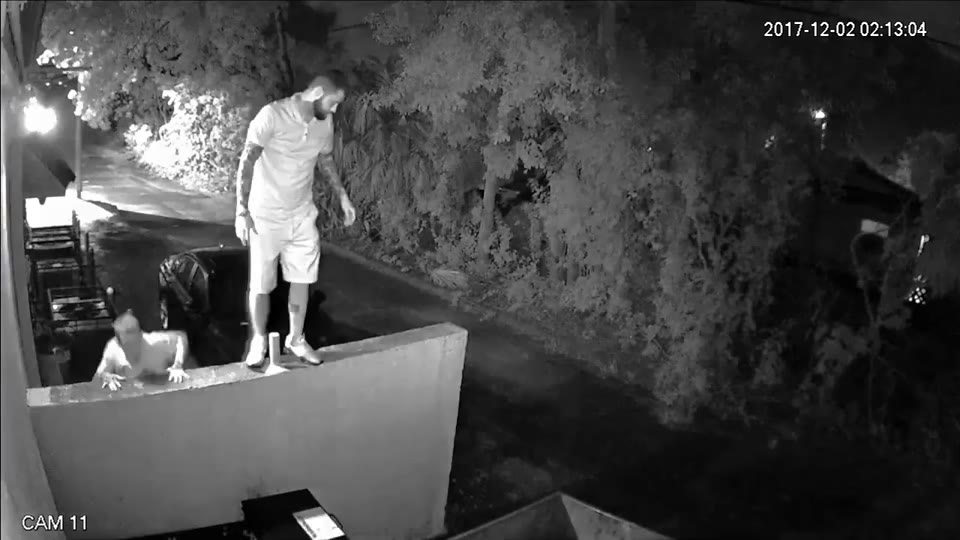
Two people on a perimeter wall, with recorded Kirkwood person detections.Fence climbing detected

Detection results

Fence climbing
Detected97.7%
Fighting
Not detected
Fire and smoke
Not detected
Person on ground
Not detected

Security, safety and retail analytics.

See what Kirkwood detects, from perimeter breaches to people counting.

Choose an animated analytics example

Physical security

Detect people climbing the perimeter fence and fights inside the property.

  • Fence climbing
  • Fights
Read the API guide
People fighting in a courtyard.
Example animation

Safety analytics

Detect people on the ground, fire, spills and blocked exits.

  • Falls
  • Fire and smoke
  • Litter and spills
  • Blocked exits
Read the API guide
A person lying on the ground in a parking entrance.
Example animation

People counting

Count people as they enter or leave. See how many are inside.

  • Entrance count
  • Exit count
  • People inside
Read the API guide
Kirkwood campus concept with a person climbing a fence.
Example counts
People inside
0
Example animation
Kirkwood · Situational awareness
Music credit

“Electric Dreams” by Scott Buckley · CC BY 4.0.

Dozens of video analytics in one API call.

Detect fights, people climbing fences, weapons, fire and more across security, safety and retail analytics.

Security

  • People fighting
  • Person climbing
  • Weapon
  • Person camping
  • Unattended bag
  • Tampering with equipment
  • Vandalism
  • Door propped open

Safety

  • Person on ground
  • Crowd dispersing
  • Blocked exit
  • Fire smoke

Operations

  • Cleanup needed
  • Camera issue
01

Kirkwood’s AI model

All detection tags in one call.

Explore the analytics API
People and vehicle counting

Get counts and bounding boxes in the same response.

View the API guide

On-prem or hybrid.

Model API

Send the frames that need judgment. Get detection results, counts and bounding boxes. In Kirkwood’s cloud or on your GPU server.

API guide

Edge box

Connect cameras over RTSP. Video stays on site: count people across lines and in zones, and raise alerts.

SDK: on-prem and hybrid

Kirkwood app

Set up cameras, draw lines and zones, and view counts and alerts.

Open the app

Try it with your cameras.

Get an API key to send your first image, or ask us about an edge box pilot.